
Android app
Mixing and mastering app for Android
Master your songs with AI on your phone. Louder, clearer and ready for release in about a minute.
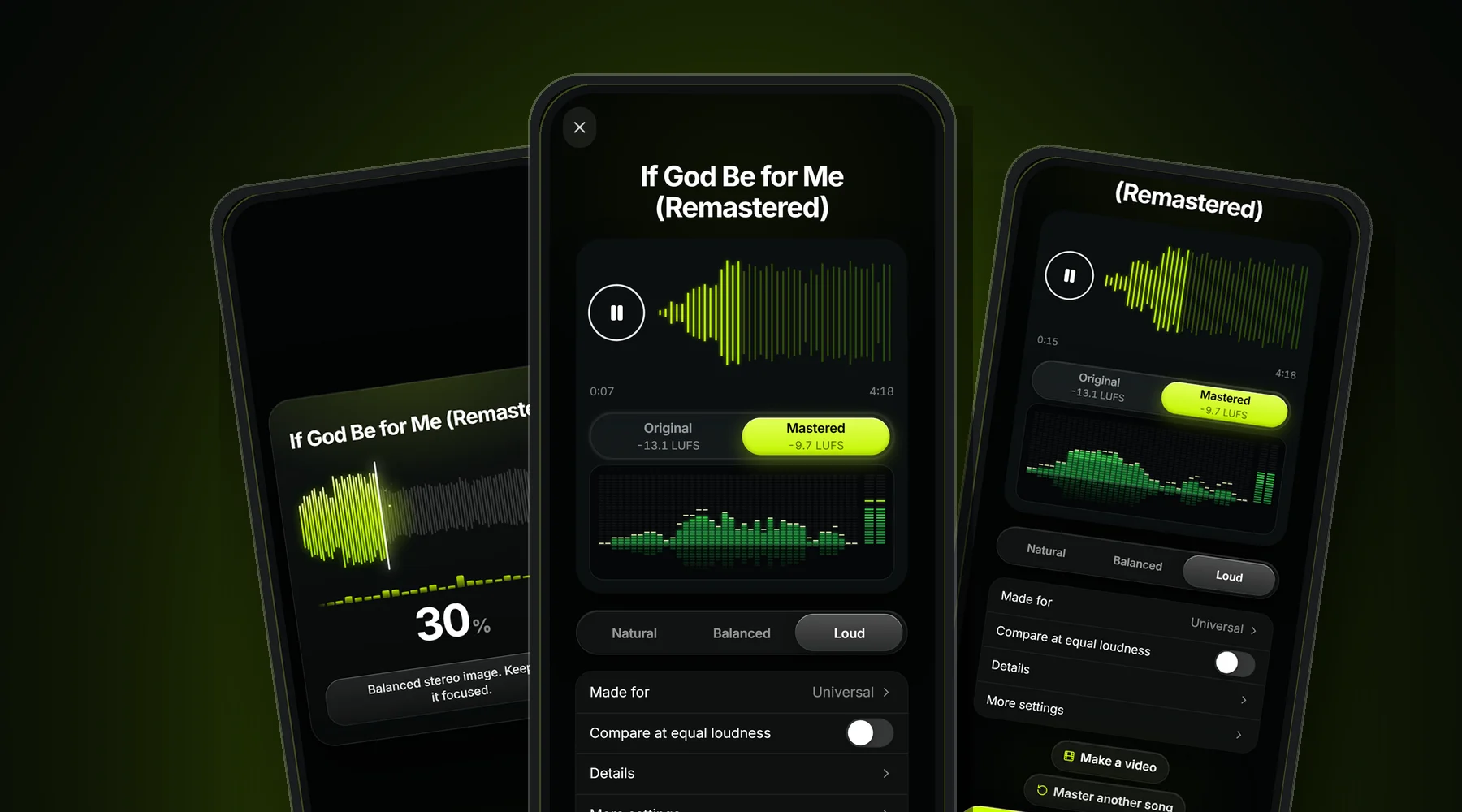
+3.4 dB
louder on our demo song
-13.1 → -9.7
LUFS, before and after
4
loudness levels
24-bit
WAV export
Hear the difference
Demo song · 30 seconds
-10.4
LUFS
+4.3 dB louder than the original
How to master a song on Android
- 1
Add your song
Pick a WAV, MP3, FLAC or M4A from your phone, Google Drive or your downloads.
- 2
The AI masters it
It measures the loudness and tone, cleans the low end, smooths harsh highs, glues the mix and sets the loudness with a true-peak limiter.
- 3
Listen and compare
Switch between the original and the master on the same moment of the song, at the same loudness, so you judge the sound and not the volume.
- 4
Choose how loud
Natural, Balanced, Loud or Heavy. Pick a sound style too: Signature, Warm, Balanced, Open or Heavy.
- 5
Download
Save your master as a 24-bit WAV, ready for Spotify, Apple Music, YouTube, SoundCloud or your distributor.
How the AI masters your song
The AI first measures your song: its loudness in LUFS, its peaks, how much it moves between quiet and loud parts, and where the energy sits from the bass to the top end. A song that is already loud and dense gets less compression, so it is not squashed twice.
Then it builds the master in the order an engineer would: a low cut for rumble, EQ for boomy or dull areas, gentle bus compression and saturation to glue the parts, a dynamic EQ that only turns down harsh highs when they appear, and a true-peak limiter that sets the final loudness without distortion.
For AI music from Suno or Udio, the harsh, metallic top end is the most common problem, so the AI listens for it through the whole song and smooths it only where it shows up.
Pick how loud your song should be
| Level | Loudness | Best for |
|---|---|---|
| Natural | -14 LUFS | Open and dynamic. The Spotify and YouTube playback level. |
| Balanced | -11 LUFS | Fuller for most pop, R&B, rap and Afrobeats. |
| Loud | -9.7 LUFS | Punchy and loud for modern rap, EDM and club songs. |
| Heavy | -8 to -5 LUFS | Maximum loudness with a Punch to Density control. |
Mixing and mastering on your phone
Mixing balances the separate parts of a song: vocal, drums, bass and instruments. Mastering is the last step. It works on the finished stereo song and makes it sound full, clear and loud enough next to other releases.
MixMasterAI does the mastering on your Android phone. Its AI also does the light mix-bus work a mastering engineer adds: it tames muddy low end, evens out the tone and glues the parts together. If your song is in separate stems, balance them first with the AI mixing tool, then master the mixdown in the app.
Songs from Suno, Udio and other AI generators are already mixed, so they only need mastering. The app smooths the harsh, metallic top end AI songs often have and brings them up to release loudness.
What to look for in a mastering app for Android
✓ Fair comparison
A good mastering app lets you hear the original and the master at the same loudness. Louder always sounds better at first, so without this you can't tell if the master is really better.
✓ Loudness you can choose
One loudness does not fit every genre. Look for settings measured in LUFS, not vague names only.
✓ Safe peaks
A true-peak limiter keeps the song from distorting after Spotify or YouTube convert it.
✓ Lossless export
Download a WAV, not only an MP3, so the quality survives your distributor's conversion.
✓ Works on your phone
Processing on the phone means no upload wait and it works with songs saved anywhere on your device.
MixMasterAI does all five.
Get MixMasterAI on Google Play

Questions
What is the best mixing and mastering app for Android?
It depends on what you need. For finished songs, an AI mastering app is the fastest route to a release-ready sound. MixMasterAI masters your song on the phone in about a minute, lets you compare the original and the master at the same loudness, and exports a 24-bit WAV. If you need to record and mix separate tracks, a mobile DAW is the better tool for that step; you can then master the mixdown in MixMasterAI.
What is the best AI mastering app?
Look for an app that shows real loudness numbers, lets you compare the original and the master at the same volume, and exports a WAV. MixMasterAI does all three, runs on your Android phone and also works in any browser at mixmasterai.co.
Is AI mastering as good as a human engineer?
For most demos, AI songs and independent releases, AI mastering gets you a clean, loud, balanced master in about a minute. A human engineer is still worth it for albums that need detailed decisions across many songs. Read the full comparison: AI mastering vs human mastering at mixmasterai.co/ai-mastering-vs-human.
Does the app mix and master my song?
MixMasterAI masters a finished mix: it cleans the low end, balances the tone, smooths harsh highs, glues the mix with gentle compression and sets the loudness with a true-peak limiter. To mix separate stems, use the AI mixing tool on mixmasterai.co, then master the result in the app.
Does mastering happen on my phone?
Yes. The mastering engine runs on your Android phone, so you hear the result without waiting for an upload. Signing in is only needed for your membership.
Which Android phones does it work on?
Phones and tablets running Android 7.0 or newer. The app download is about 3 MB.
Which audio files can I master?
WAV, MP3, FLAC and M4A. Songs from Suno, Udio, Mureka, ElevenLabs Music and other AI music generators work, as do your own recordings and beats.
How loud will my song be?
You choose: Natural is about -14 LUFS (the Spotify level), Balanced about -11 LUFS, Loud about -9.7 LUFS, and Heavy goes from -8 to -5 LUFS for club and rap records, with a Punch to Density control.
How much does it cost?
You can master a song and listen to the result before you join. Unlimited mastering and 24-bit WAV downloads come with the MixMasterAI membership, shown in your local currency in Google Play. Cancel anytime in Google Play.